Creative Diversity
Creative Diversity: See Which Audiences Your Meta Ads Actually Speak To
Wilow's Creative Diversity report maps your Meta ads to the customer personas they speak to, with spend and ROAS for each. Spot the gaps. Free plan.
Founder, Wilow
·
September 16, 2026
Updated 16 September 2026: Creative Diversity is now a persona report. Updated 31 July 2026 to reflect Meta's Q2 2026 earnings call, where CFO Susan Li introduced Meta Generative Recommender, an LLM deployed into ads retrieval. Read the transcript →
Meta's retrieval engine does not reward volume. It rewards variety. In July 2026 Meta deployed an LLM, called Meta Generative Recommender, into that engine, meaning the system now reasons about the creative itself rather than mechanically scanning summaries. When your account runs twenty ads that are functionally the same (same visual style, same hook, same message), the retrieval engine groups them as one ad in the retrieval stage. You entered the auction with one ticket, not twenty.
Wilow's Creative Diversity report shows you who your ads are actually speaking to. It reads every ad you are running, works out the distinct groups of people your brand targets, and places each ad with the persona it serves. Not which ad is winning: the Creative Leaderboard does that. Creative Diversity answers a different question: is your creative spread across the people you want to reach, or is one audience getting every ad while the others get none?
How Creative Diversity works
You build the report in four steps, shown as a progress bar across the top of the page: reading ads, confirming personas, labelling ads, and the report itself.
- Reading ads. Wilow reads the ads in your connected Meta account and builds a picture of the brand: what it sells, who it sells to, and the distinct audiences its ads speak to. This can take up to an hour.
- Confirming personas. Wilow suggests between three and six personas, each with a name and a short description of the customer it covers. You stay in control: rename them, rewrite them, add your own, or reset to the suggestions, then submit.
- Labelling ads. Every ad is read again against the personas you confirmed and assigned to exactly one of them. You can leave the tab; the run carries on. Each ad also gets its offer, type, emotion and readiness labels.
- The report. The persona map shows the result.
Reading the persona map
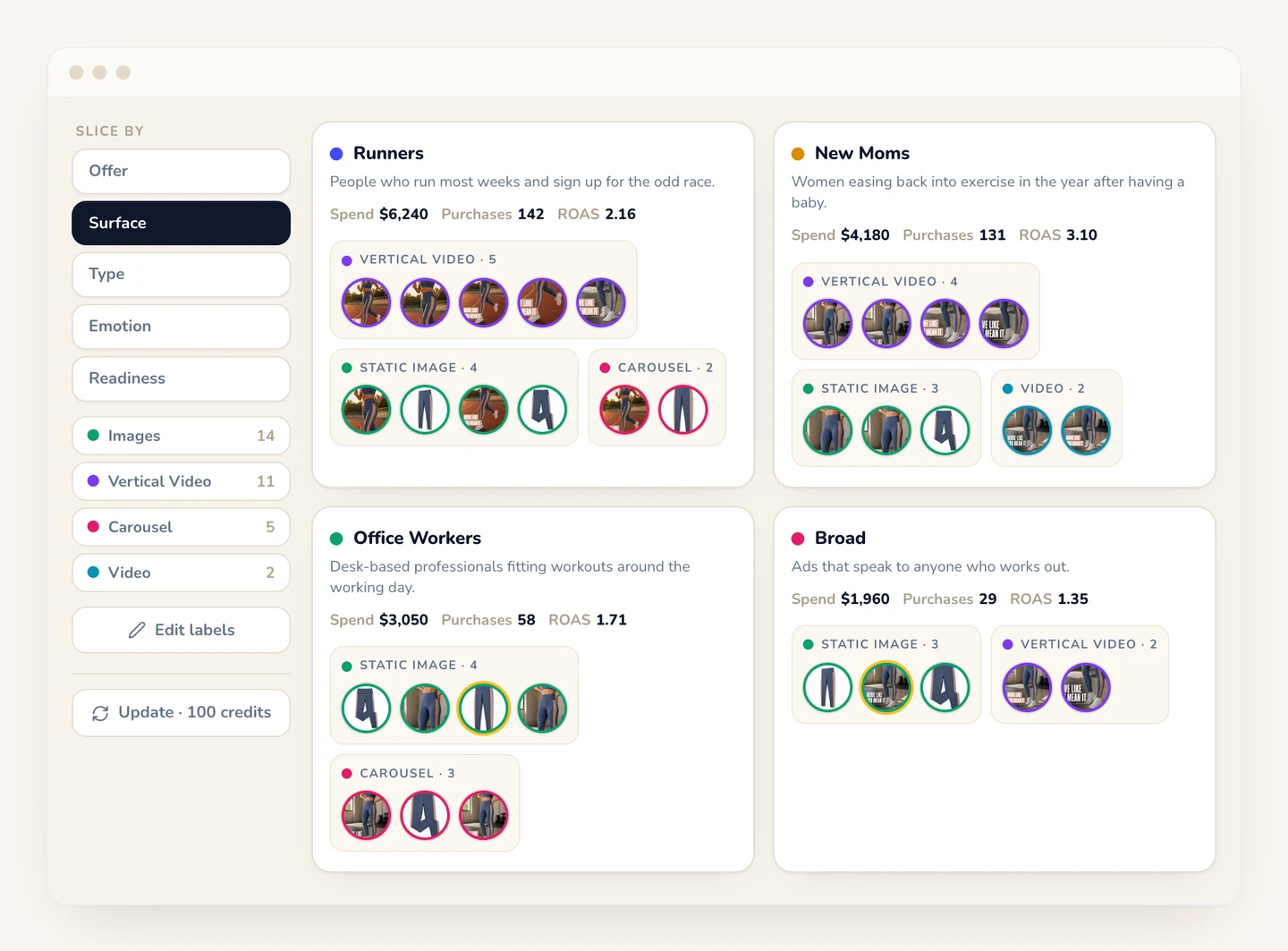
The map gives each persona its own column, ordered by how many ads it holds. The top of each column shows the persona's name and description, its spend, the results for the conversion action you have selected, and its ROAS (or cost per action, when the action is not a purchase). Below that sit the persona's ads as thumbnails, grouped by label.
A "Slice by" rail on the left changes the grouping: offer, surface, type, emotion or readiness. Pick one value in the legend and every ad outside it fades back, so you can see at a glance which personas get your UGC, your testimonials or your promo offers, and which get none. If you remove a persona, its ads move to an Unassigned group.
The picture you are looking for is simple:
- One tall column and several thin ones: most of your creative is aimed at one audience. That is concentration risk. If that audience tires of your ads, nothing else is running to catch the fall.
- Spend and results pointing at different personas: budget sits with one audience while another is quietly delivering the purchases.
- A persona whose ads are all one type or one offer: you are reaching that audience, but with a single idea.
Labels you can check and correct
A second AI pass checks the persona, type, offer and readiness labels against the ad itself. An ad with one label it judges wrong, or two it judges weak, is flagged on the map. Open any ad and each weak or wrong label shows a warning, a suggested alternative and the evidence behind it.
Click any ad to open its labels and change them; changes save immediately. "Edit labels" opens the full table, where you can sort ads by spend or results, select several at once and relabel them together. When your ads change, "Update" re-runs the report, starting from the personas you already confirmed so you can adjust them first.
Why this matters for Meta advertising in 2026
Before content-based delivery, scaling Meta ads meant scaling budget. You found a winning ad, duplicated it into new ad sets with different audience settings, and spent more. The algorithm did what you told it.
Now the algorithm reads the creative itself and decides who sees it. Audience settings matter less. Creative variety matters more. In July 2026 Meta deployed Meta Generative Recommender, an LLM inside ads retrieval that reasons about the creative content and the person together rather than individually scoring ads. An account running genuinely different ads (different formats, different emotions, different personas) gives the retrieval engine more distinct candidates to match against different people. An account running variations of one idea gives it one.
When the creative does the targeting, the question is no longer which audience you selected in Ads Manager. It is which people your ads are written for. Creative Diversity answers that question from the ads themselves. It does not score your mix or tell you what to make next. It shows you the spread, persona by persona, so you can see the gaps. You cannot act on what you cannot see, and most Meta advertisers cannot see this.
Pricing
Your first Creative Diversity report for each ad account is free. After that, running or updating a report uses credits: 50 on Free and 100 on Pro and Max, one for each ad the report can read. Free reports cover up to 50 ads from the last 7 days; Pro and Max cover up to 100 ads from the last 30 days. The Free plan has no time limit and needs no credit card. Pro is $49/month for up to 10 ad accounts and 12 months of history.